Create a new page
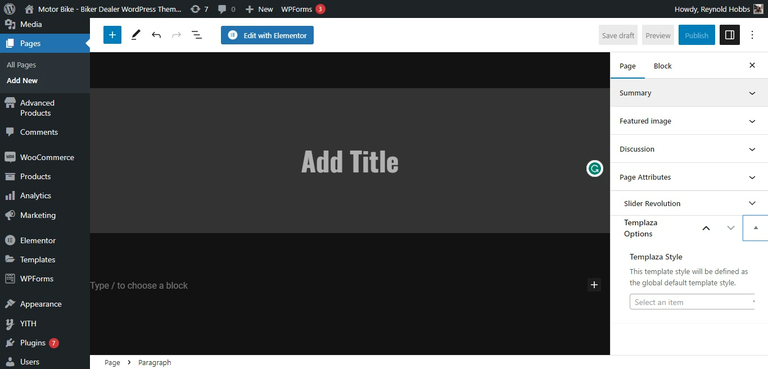
To create a new page navigate to the "Pages" dashboard menu item in your WordPress admin panel and click on Add new button.
Page Templates
Choose either the "Blog Archive" (blog page) or "Default Template" (regular page) option in the Summary > Template sidebar.

Assign a page to a TemPlaza style
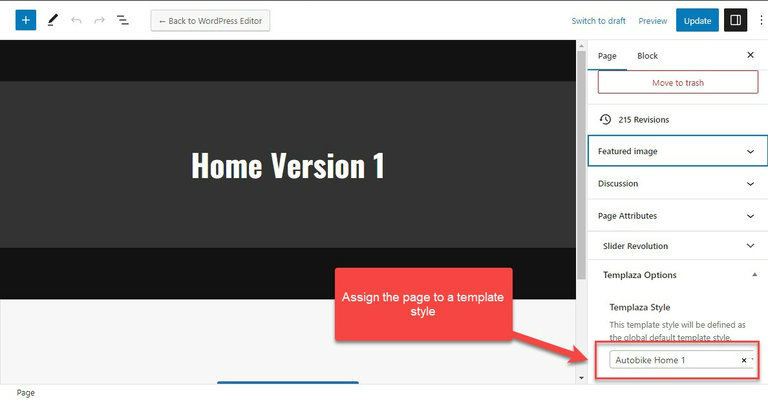
When editing a page, you can see TemPlaza options on the right side. Assign the page to a specific template style or it'll be inherited from the settings if you leave it blank.
You can find all the template styles in the Theme Options > Templates
Elementor Page Builder-related tutorials
Usually, the page consists of Sections, Columns, Widgets and some other elements that can be edited via Elementor. Before you start, please check the following tutorials:
- Official Elementor Tips page
- Getting Started With Elementor
- Official Documentation for Elementor page builder
- Official Elementor Video Tutorials
Assigning a Page as a Homepage
Once you finished building your page, assign it as a Homepage:
- Navigate to Settings > Reading menu item in the WordPress dashboard menu.
- In Your homepage displays section select A static page (select below) option and choose the necessary page from the Homepage drop-down list.
- Save the changes.
